Pricing
Login
Login
Quiz MakerFlashcard MakerNote MakerStudy Guide MakerPodcast GeneratorAI Tutor
PDF to QuizPDF to NotesPDF to FlashcardsPDF to PodcastVideo to NotesView all use cases
Exam prep
NCLEX-RN QBank (Beta)
Subjects
MedicineNursingDentistryLawPharmacy
Pricing
Back to Support Centre

Frequently asked questions

How can I duplicate a Course?

Want to make a copy of your Course? Here's how.

Updated Jun 19, 2026

Duplicating a Course allows you to create an exact copy of an existing Course, including all its content, structure, and settings. This is useful when you want to:

  • Create a new version of a course for a different audience
  • Make a backup before making significant changes
  • Use an existing Course as a template for a new one

Steps to duplicate a Course

  1. Navigate to the Course page of the course you want to duplicate
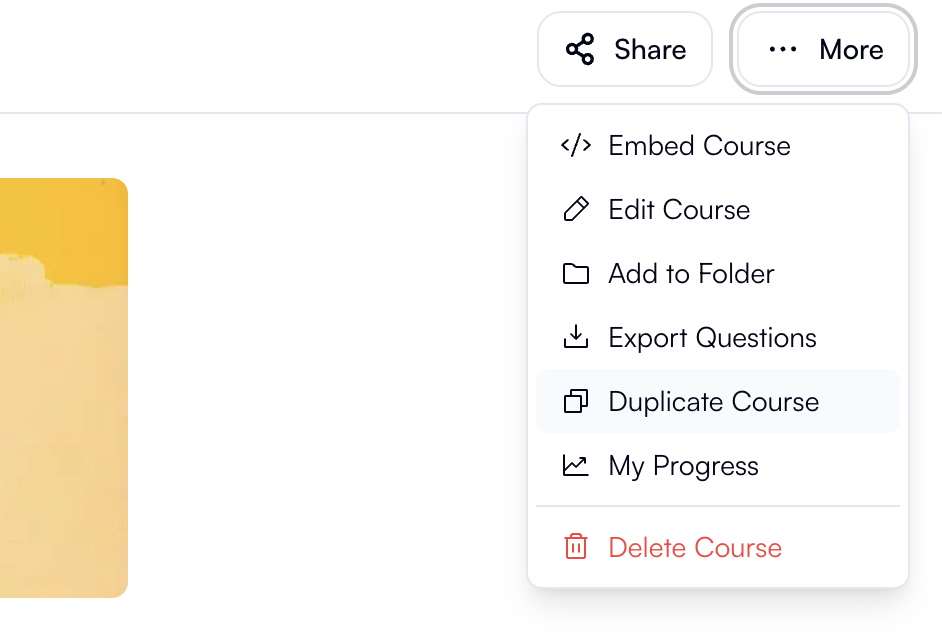
  2. In the top right corner, click the More button (represented by three dots)
  3. From the dropdown menu, select Duplicate Course
  4. Your course will be duplicated, and you'll be redirected to the new copy
Article screenshot

What gets duplicated?

When you duplicate a Course, the following elements are copied:

  • Course title (with "Copy" appended)
  • All course content and modules
  • Course settings and configuration
  • Questions and assessments

After duplication

Once duplicated, your new Course is completely independent from the original. Any changes you make to the duplicate will not affect the original course, and vice versa.

Tip: Remember to rename your duplicated course and make any necessary adjustments before sharing it.

Still need help?

Ask AI Support for help finding an answer or your next step.

Ask AI Support

Related articles

  • General FAQs
  • What types of quiz questions can I create?

Footer

DiscordTiktokInstagramXFacebookSupportChrome

Tools

  • AI Quiz Generator
  • AI Flashcard Generator
  • AI Note Maker
  • AI Podcast Generator
  • AI Study Guide Maker
  • AI Tutor

Subjects

  • Medicine
  • Nursing
  • Dentistry
  • Law
  • Pharmacy

Resources

  • Blog
  • API
  • Help Center
  • Browse courses
  • Free Courses

Legal

  • Terms
  • Privacy
  • DMCA
  • DPA
  • Cookies

Company

  • About Us
  • Security
  • Refunds
  • Disclaimer
  • Acceptable Usage
English